How to Build a Marketplace on Bubble: Templates, Features and Costs
A practical guide to building a marketplace on Bubble: what it needs, which ready-made templates to start from, and how long and how much it takes.
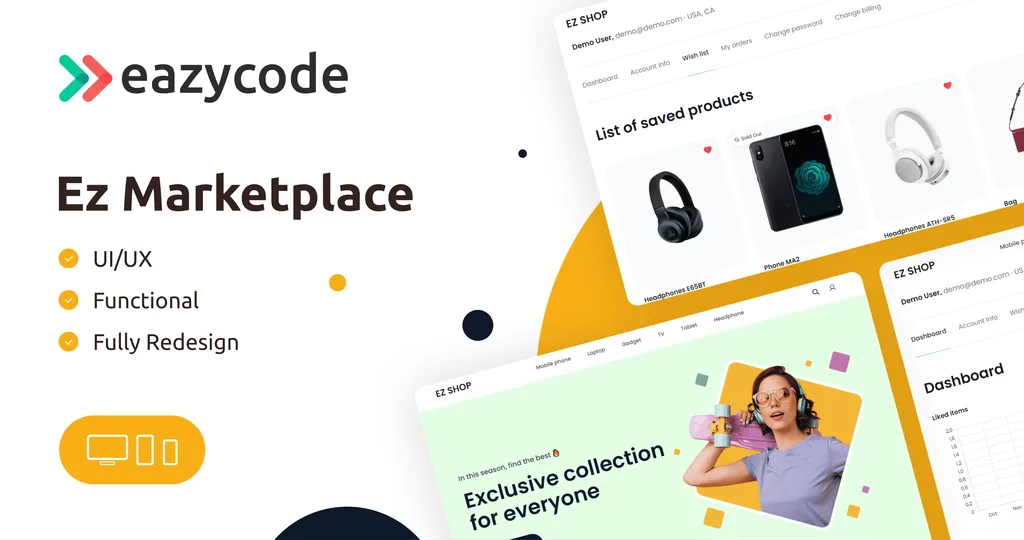
A marketplace connects two sides: people who offer something and people who want it. Online shops, rentals, freelance platforms, food delivery and travel booking all follow the same pattern, and they are one of the most common products built on Bubble. This guide covers what a marketplace needs, how a template shortens the work, and what the project takes in time and budget.
What a marketplace needs
Most marketplaces need the same building blocks, whatever they sell:
- Listings and search. Sellers or providers publish offers, and buyers browse them with filters.
- Accounts for both sides. Buyers and sellers sign up, manage a profile and see their own activity.
- A purchase or booking flow. A cart and checkout for products, or a booking flow for services and stays.
- Payments. Money moves from the buyer to the seller, usually with a commission for the platform.
- An admin panel. You manage users, listings and orders in one place.
- Trust features. Reviews, messaging and notifications help both sides feel safe.
Building all of this from scratch means designing dozens of screens and workflows before you can show anything to a customer. A template gives you the structure on day one, so you spend your time on what makes your marketplace different.
Start from a template or build from scratch?
A template is the faster choice when your idea fits a known pattern: a shop, a travel marketplace, food delivery. You get working screens and a data model you can change in the Bubble editor, and you can test the idea with real users much sooner.
Building from scratch makes sense when your workflow is unusual and no template is close. Even then, a template is useful as a reference for how the screens could fit together.
Marketplace templates from EazyCode
We publish 16 templates in the marketplace category. These are the ones people most often start with. Prices are shown as Standard / Developer license.
| Template | Best for | Price | Installs |
|---|---|---|---|
| Ez Marketplace - Shop v3.0 | A shop-style marketplace | Free | 22.6k+ |
| Ez Travel Marketplace | A tourism business | Free | 4.9k+ |
| Ez Marketplace Pro - Shop | Marketplaces with a blog and an admin panel | $189 / $689 | 34+ |
| Ez Marketplace Shop | An online shop and marketplace | $163 / $563 | 12+ |
| Ez Food Delivery App | Food delivery | $499 / $1999 | 27+ |
| Ez Crypto & NFT Market | Buying, selling and swapping crypto and NFTs | $235 / $635 | 40+ |
| Ez AI Marketplace | A marketplace with an AI assistant | $76 / $376 | 12+ |
| Ez Marketplace Mobile | Mobile apps for online stores | $38 / $338 | 4+ |
Ez Marketplace - Shop v3.0 is the usual starting point: it is free, has the most installs and includes filtered search, a results page, a checkout page, a blog and an admin panel. Ez Marketplace Pro adds a blog and an admin panel to a marketplace, and Ez Travel Marketplace is a free base for tours and bookings with a tour page, news, an admin panel and a user dashboard.
Every template has a live demo. Open it, click through the buyer and the admin side, and see how close it is to your idea. You can compare all of them in Bubble marketplace templates.
What to change in a template
Whichever template you choose, the same changes come up:
- Branding and content. Your logo, colors, texts and categories.
- The data model. Add the fields your listings need, such as size, location or availability.
- Payments and fees. Set how money moves and what commission you take.
- Notifications. Emails and messages for orders, bookings and replies.
- Admin rules. Who can approve listings, handle disputes and see reports.
Most template pages link to documentation that explains the structure, which helps when you start customising.
How long it takes and what it costs
We work hourly at $40 per hour. A dedicated developer is 40 hours a week, which is $1,600 per week.
- About 2 weeks for a focused prototype, from $3,200.
- About 4 weeks for a typical MVP with accounts, core workflows and payments, around $6,400.
- 6 to 8 weeks for a complex marketplace with several roles and an admin area, roughly $9,600 to $12,800.
These are estimates for one full-time developer. After a free call we confirm the scope and give you an hour estimate before any work starts. Starting from a template usually shortens the first phase because the base screens already exist.
Common mistakes to avoid
- Building every feature before you have users. Launch with the core flow and add features when people ask for them.
- Chasing both sides at once. Marketplaces need supply and demand. Start with one side, usually the sellers, and bring the other in after.
- Ignoring the admin side. Approving listings and handling issues take real time. Plan for them from the start.
- Skipping the demo test. Before you commit to a template, use its demo with your own scenario in mind.
Next steps
If you want to explore on your own, start with a free template from our best free Bubble templates list. If you would like us to build or customise your marketplace, see Bubble MVP development or hire Bubble developers.