How to Build an Event Ticketing Platform on Bubble
What an event ticketing website needs, how the Ez Tickets & Events template covers it, and what to add before you launch your own platform.
Event ticketing platforms look simple from the outside: people browse events and get tickets. Behind that sit event pages, different kinds of users, ticket sales and an admin area to keep everything under control. This guide explains what such a platform needs and how a Bubble template can give you a working starting point.
What an event ticketing platform needs
- A catalog of events. Visitors browse upcoming events and sort them.
- Event pages. Each event has the details people need before they decide: what, when, where and how to attend.
- Event creators. Organisers publish their own events and sell tickets for them.
- Buyers. People who sign up, find an event and get tickets.
- An admin area. You track all activity on the platform and keep it in order.
Many platforms also need payments, ticket limits and notifications. Those depend on your business model, and they are the parts you will most likely customise.
Ez Tickets & Events: a ready-made starting point
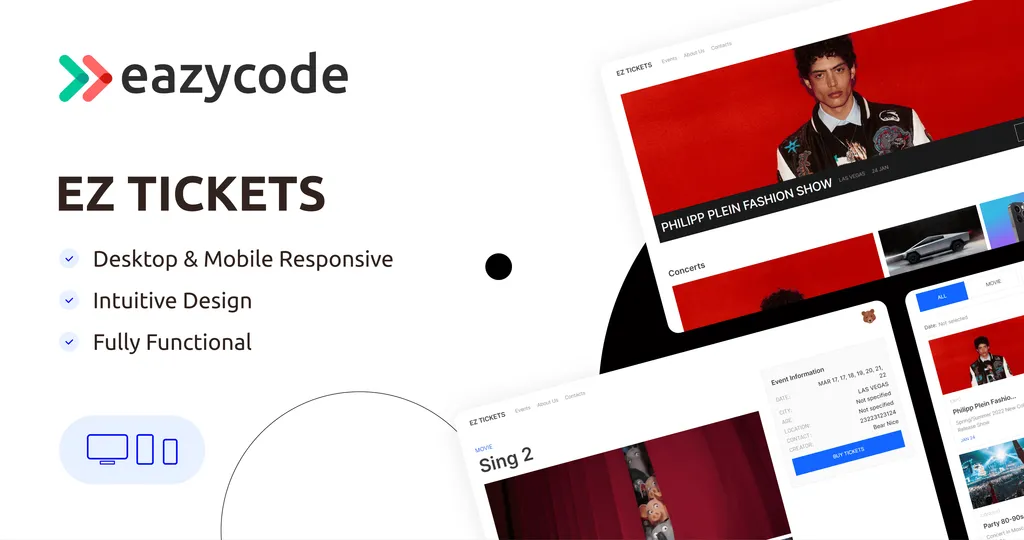
[Ez Tickets & Events](/template/ez-tickets-events-template) is an events website for people who want to attend movies, concerts, theaters and similar shows. It is built on Bubble and aimed at event management companies, theater groups, sports leagues, concert organisers and trade show coordinators.
The template includes:
- A home page that grabs attention and gives visitors a quick way to navigate.
- A catalog showing all upcoming events with sorting options.
- Individual event pages with the information visitors need.
- Three types of users: enjoyers, creators and administrators.
- An admin page where managers track activity on the platform.
- Event creation, so creators can publish events and sell tickets.
It costs $143 for the Standard license and $543 for the Developer license, and there is a live demo you can click through as an enjoyer, a creator and an admin.
When your events run on appointments and slots
Some event businesses sell time slots rather than seats: classes, consultations, workshops with limited places. For that, look at [Ez Appointment PRO](/template/ez-appointment-pro), an online booking template for managing appointments, resources and clients. It is designed for businesses such as healthcare providers, beauty salons and consultancies, and it gives you real-time insight into client interactions and resource usage. It costs $183 (Standard) or $783 (Developer).
You can see both in the event management templates category.
What to add before you launch
A template gives you the structure. Before you open the platform to the public, plan these parts for your own project:
- Payments. How buyers pay and how organisers get paid, including any commission you charge.
- Capacity. Limits on how many tickets or places an event can sell.
- Ticket delivery. How buyers receive and show their tickets.
- Notifications. Confirmations and reminders for buyers and creators.
- Rules and refunds. What happens when an event is cancelled or changed.
These are normal customisations, and all of them can be built in the Bubble editor. If you would like us to do it, see Bubble MVP development.
How long it takes and what it costs
We work hourly at $40 per hour, which is $1,600 per week for a full-time developer. A focused prototype takes about two weeks, a typical MVP about four weeks, and a larger platform with several roles six to eight weeks. Starting from a template usually shortens the first phase. After a free call, we confirm the scope and give you an hour estimate before any work begins.
Next steps
Open the Ez Tickets & Events demo, try each role, and write down what is missing for your idea. Then talk to us and we will tell you how long it would take to close the gap. If you are comparing options, see our guide to building a marketplace on Bubble.