RTL and Arabic Support in Bubble: How to Build an RTL Dashboard
Planning an app for Arabic, Hebrew or Persian users? Here is what right-to-left support involves, the dashboard design patterns to follow, and a Bubble template that already supports RTL and LTR.
Millions of people read and write right to left. If your app serves Arabic, Hebrew or Persian speakers, a layout designed only for left-to-right text will feel wrong to them: menus on the wrong side, misaligned text, arrows pointing the wrong way. This guide explains what RTL support involves and how to start from a Bubble template that already handles it.
What RTL support means
Right-to-left support is more than aligning text to the right. A properly supported app mirrors its whole layout so the interface reads naturally from right to left:
- Text direction and alignment. Paragraphs, labels and inputs run from right to left.
- Mirrored layout. The main navigation, sidebars and the order of columns flip to the right side.
- Direction-aware icons. Arrows, chevrons and "back" or "next" icons point the other way.
- Mixed text. Numbers, brand names and Latin words inside Arabic sentences must still read correctly.
- Fonts. Choose fonts that support the Arabic, Hebrew or Persian script.
The goal is that an RTL user never feels the interface was translated; it should feel built for them.
RTL dashboard design patterns
Dashboards are the most common screens people mirror, and a few patterns make them work well in RTL:
- Put the sidebar on the right. Navigation moves to the reading start of the page.
- Align table columns and text to the right. The first column appears on the right and the order of columns reads from right to left.
- Mirror directional icons, but not everything. Flip arrows and chevrons; keep logos, media controls and symbols that have a fixed meaning.
- Keep numbers readable. Digits stay in their normal order inside right-to-left text, and charts should still be easy to scan.
- Place actions where the eye ends. Primary buttons usually sit on the left of a form in RTL, the end of the reading direction.
- Test with real content. Use real Arabic, Hebrew or Persian text, not placeholders, because string length and punctuation change the layout.
A Bubble template with RTL and LTR built in
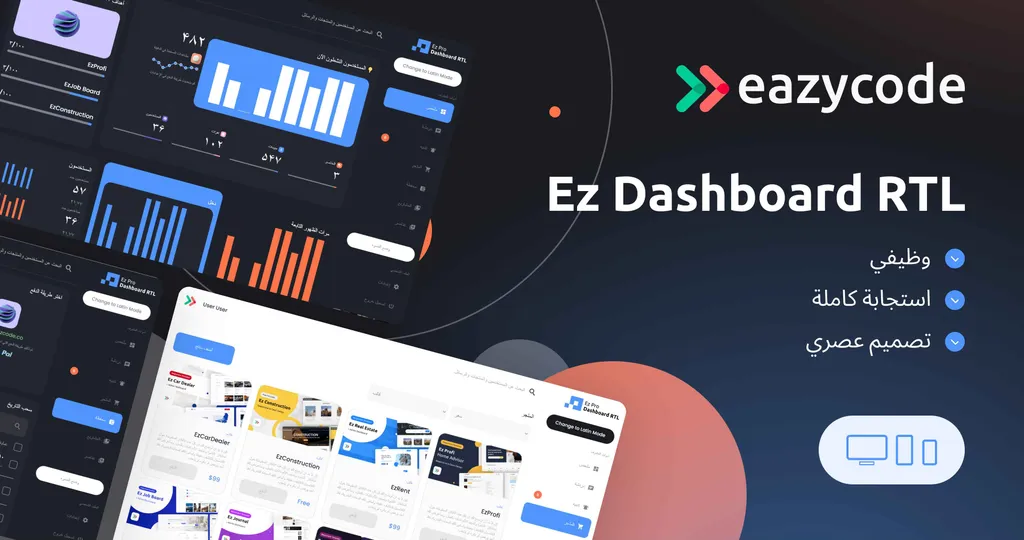
[Ez Dashboard RTL](/template/ez-dashboard-rtl) is an adaptive Bubble template created for projects in countries where text is written from right to left. It supports both RTL and LTR languages, including Arabic, Hebrew and Persian, and lets users switch between the two directions.
It includes:
- RTL and LTR switching between text directions.
- Chat for real-time messaging.
- Wallet for financial transactions inside the app.
- Graphs to visualise your data.
- Marketplace to showcase products or services.
- Dark and light mode that users can switch between.
It costs $146 for the Standard license and $546 for the Developer license, and it has a live demo and documentation. If you are comparing dashboards, see all Bubble dashboard templates.
What to check before you launch an RTL app
- Translate content and interface strings with native speakers, not only machine translation.
- Review every screen in RTL, including forms, error messages and emails.
- Check dates, numbers and currencies for the formats your users expect.
- Test on mobile, where small screens expose layout problems quickly.
- Plan for both directions if you serve mixed audiences, so users can switch.
Build it with us
If you want your app customised for RTL users, or a dashboard built from scratch around your data, our team can do it. We work at $40 per hour; a typical MVP takes about four weeks. See Bubble MVP development or hire Bubble developers.